Data
Shop Floor Data Collection: Keep the Five Fields You Trust

Anthony Occidentale and Alex LaDouceur
· 11 min read
Most shop-floor forms would produce better decisions with half the fields. Every box an operator fills in competes for the same few seconds of attention, and the boxes nobody reads or owns go bad first. Five fields you can trust will tell you more than fifty you have to argue about.
A complete downtime sheet can still mislead
Picture a press line with a 22-field downtime sheet: start and end time, a reason code from a list of 40, a sub-reason, part number, operator ID, comments and more. Every sheet comes back filled in. Yet "Other" is the third-largest downtime reason on the weekly report, and stops under 10 minutes barely appear.
The operator who stopped the press four times in an hour wrote all four up at 2:50 p.m., ten minutes before shift end, from memory. Every box got an answer. Few of those answers can be trusted.
Vendors describe the same habit. MachineMetrics, which sells machine monitoring, writes that "busy operators might simply document that the machine was down with a gut feeling about the duration." Guidewheel, another monitoring vendor, reports the pattern at scale: across more than 3,000 machines it monitors, "Other Operational" was the largest single downtime category, at 28% of total downtime (Guidewheel, 2026).
Maintenance records show it too. Thurston Sexton and Michael Brundage of the National Institute of Standards and Technology studied the problem with Melinda Hodkiewicz of the University of Western Australia (Prognostics and Health Management Society conference, 2019). They describe a technician who picks a field that lets him "skip categorization (i.e., 'misc', or 'other')" and types free text anyway, "bypassing the intent of such a system."
On the Elsmar Cove quality forum, a member chasing scrap costs wrote that operators "either don't complete the form or it is written in an ambiguous manner in an attempt to avoid responsibility." A reply set the ceiling on what operators can reliably record: "a simple notation of what defect, when, where and how many." That's four fields.
Capture-everything advice breaks at the keyboard
The common advice says more data means better decisions. Software vendors build on it. CAI Software's page for its manufacturing execution system (MES), the software that tracks work on the floor, promises to "capture everything in real time, from machine data to operator performance, so nothing gets missed." MachineMetrics warns that legacy MES products force "manual data collection and analysis, leading to delayed, inaccurate data."
The second claim holds, and it limits the first. Machines record counts and stop times at almost no cost. People pay for every field in time and attention, and capture-everything thinking breaks in three places once a person holds the pen.
Attention is fixed. A 30-field form rarely gets more time than an 8-field form, so the extra fields get filled faster and worse.
Meaning drifts. In Out of the Crisis (1986), W. Edwards Deming wrote that "an operational definition puts communicable meaning into a concept." Words like good, reliable and safe, he added, "have no communicable meaning until they are expressed in operational terms of sampling, test, and criterion." Ask three supervisors what "scrap" means on your sheet and you may get three numbers.
Volume hides error. Tadhg Nagle, Thomas Redman and David Sammon had 75 executives check 10 to 15 critical attributes on the last 100 records their departments created. On average, 47% of new records had at least one critical error, and only 3% of the scores met the authors' loosest standard for acceptable (Harvard Business Review, 2017). Their method also makes the case for focus: each department was judged on a handful of attributes.
Every added field taxes the others
Entry burden comes first. Mirta Galesic and Michael Bošnjak told web-survey invitees the questionnaire would take 10, 20 or 30 minutes and shuffled the order of question blocks. Longer stated lengths drew fewer starters and finishers, and questions placed later got faster answers, shorter open-ended replies and less varied grid answers (Public Opinion Quarterly, 2009). A shift-end downtime sheet sits at the back of a long day, in the same position as those late questions.
Back-filling follows. When a form takes longer than the work allows, people finish it afterward from memory. Short stops go first, because nobody remembers a four-minute jam at shift end.
"Other" absorbs the rest. A 40-item pick list takes longer to read than many stops take to clear. The quickest choice wins, and the quickest choice is usually "Other."
The top of the list wins too. Jon Krosnick (1991) called this satisficing: when a task is hard and motivation is low, people settle for the first acceptable answer. On a printed or on-screen list, that shows up as a primacy effect, with options near the top picked more often.
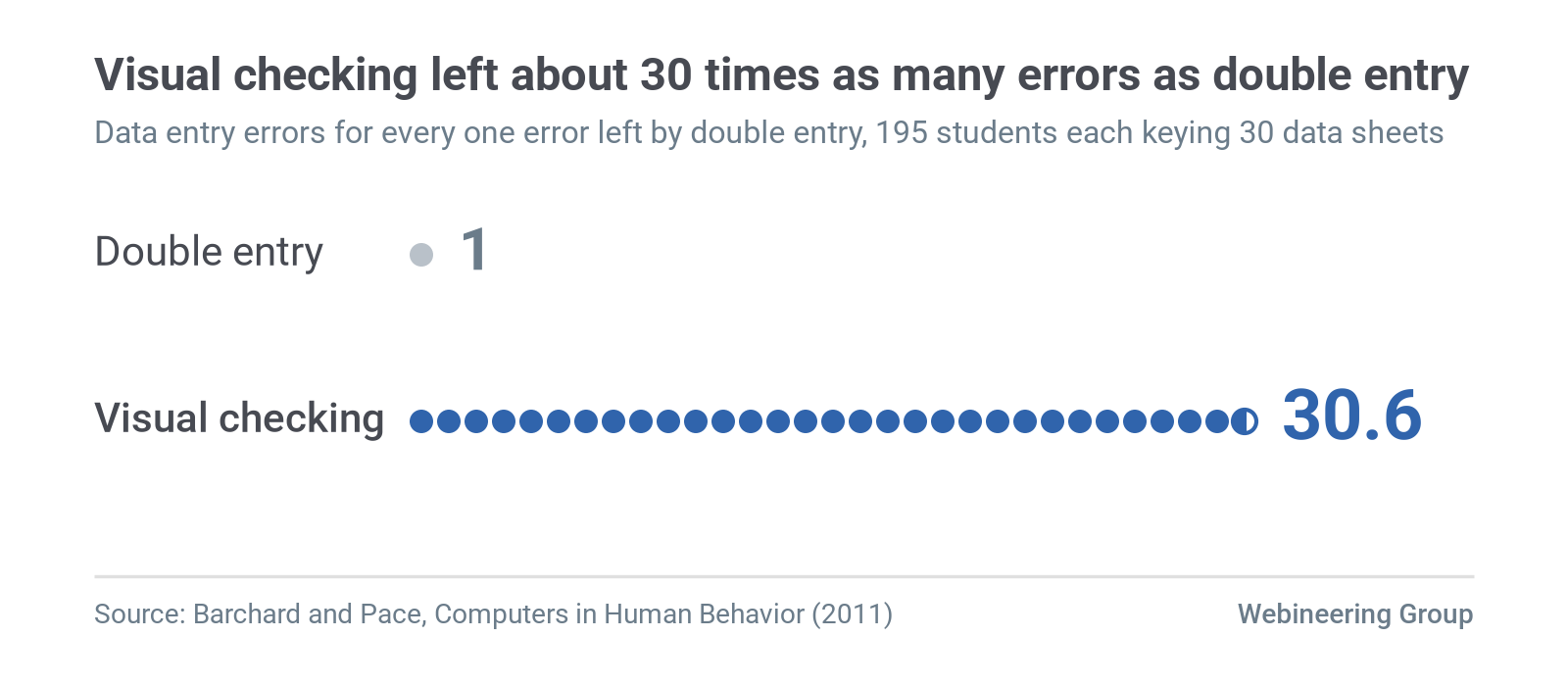
Second looks catch less than managers expect. In a 2011 study, Kimberly Barchard and Larry Pace randomly assigned 195 undergraduates to one of three data entry methods, and each student keyed 1,260 values. Students who typed each value once got 0.95% of values wrong. Visual checking left 0.82% wrong, and the authors found it "was not significantly better than single entry." Typing everything twice and letting the computer compare left 0.027% wrong, so visual checking produced 2,958% more errors than double entry (Computers in Human Behavior, 2011).
Double entry costs time: Barchard's lab at the University of Nevada, Las Vegas reports that it took 33% longer than visual checking, which took 25% longer than single entry. Even so, a second independent capture catches errors that a second look leaves in place.
Fields with no use and no owner decay fastest. Nobody notices a bad value in a column nobody reads, so nothing corrects it.
Short checklists cut surgical deaths
Medicine offers clear evidence that a few sharp items can change outcomes. The World Health Organization's Surgical Safety Checklist has 19 items, and the printed form states: "This checklist is not intended to be comprehensive." Alex Haynes and colleagues introduced it between October 2007 and September 2008 at eight hospitals, in cities from Toronto and Seattle to New Delhi and Ifakara, Tanzania. Across 7,688 patients, in-hospital deaths fell from 1.5% to 0.8%, and complications fell from 11.0% to 7.0% (New England Journal of Medicine, 2009).
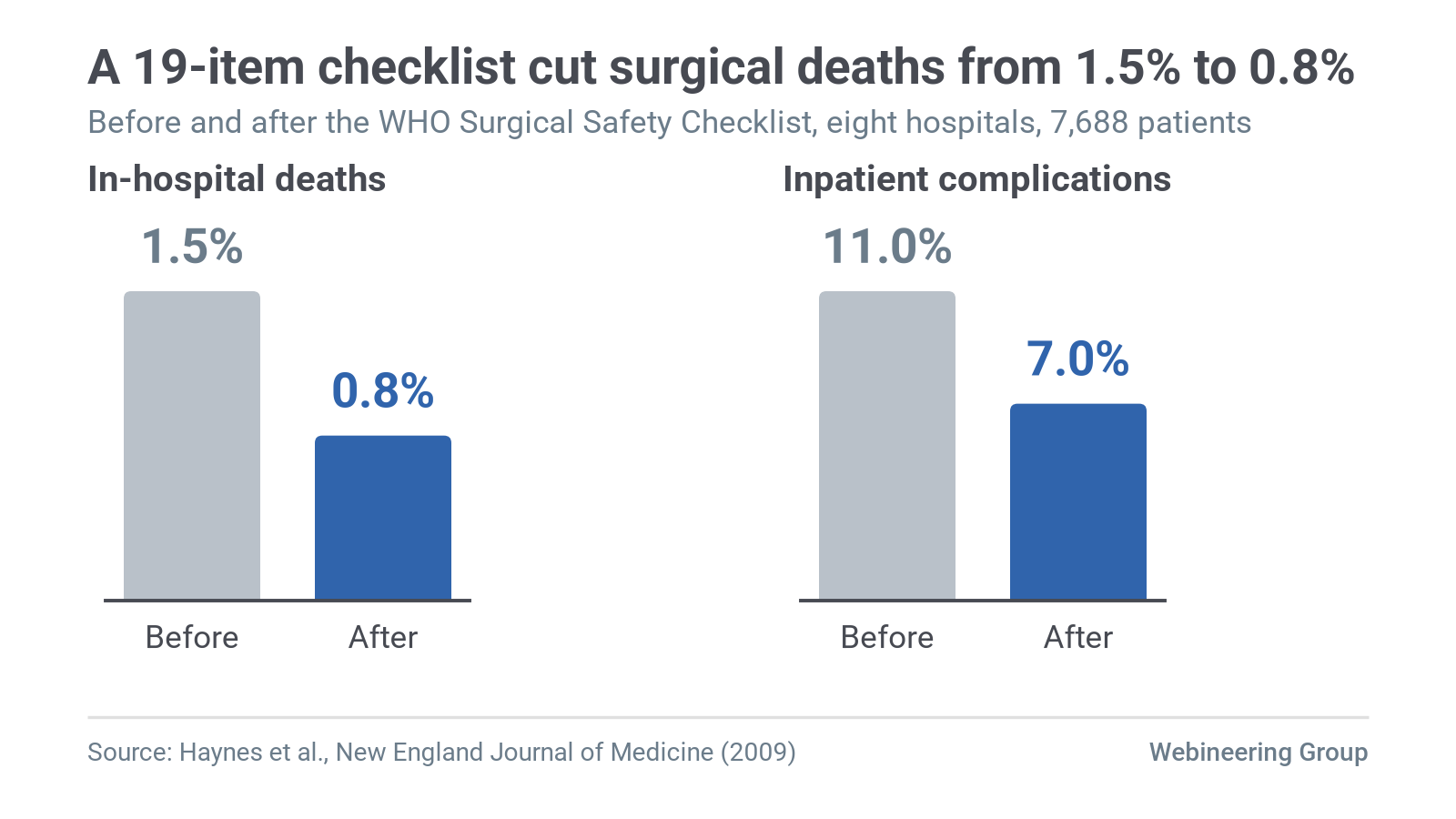
The design was deliberate. The team checks a short list of high-stakes items aloud at three points: before anesthesia, before the first incision and before the patient leaves the operating room.
Short lists still need follow-through. When 101 Ontario hospitals adopted checklists province-wide, David Urbach and colleagues tracked more than 215,000 operations (New England Journal of Medicine, 2014). The adjusted risk of death within 30 days of surgery went from 0.71% to 0.65%, and neither deaths nor complications fell significantly. Item count is one design choice, and the team still has to use the list as intended.
Aviation reached the same limit decades earlier. In a 1990 report for NASA's Ames Research Center, Asaf Degani and Earl Wiener observed 42 airline crews on 72 flights. They warned that a long checklist "carries the risk that some pilots might choose not to use the checklist or conduct it poorly because of its length." One airline's checklist for engine start, taxi and takeoff ran to 81 items, and its pilots told the authors they worried about poor checklist discipline.
A shop-floor form with 22 fields faces the same pressure, and it gets filled in many times a shift.
Four tests decide which fields stay
Data managers already name what a good field delivers. A 2013 white paper from the UK working group of the Data Management Association defines accuracy as "the degree to which data correctly describes the 'real world' object or event being described." It treats completeness and timeliness as separate dimensions, each measured on its own. The four tests below check for the usual causes of failure on each one.
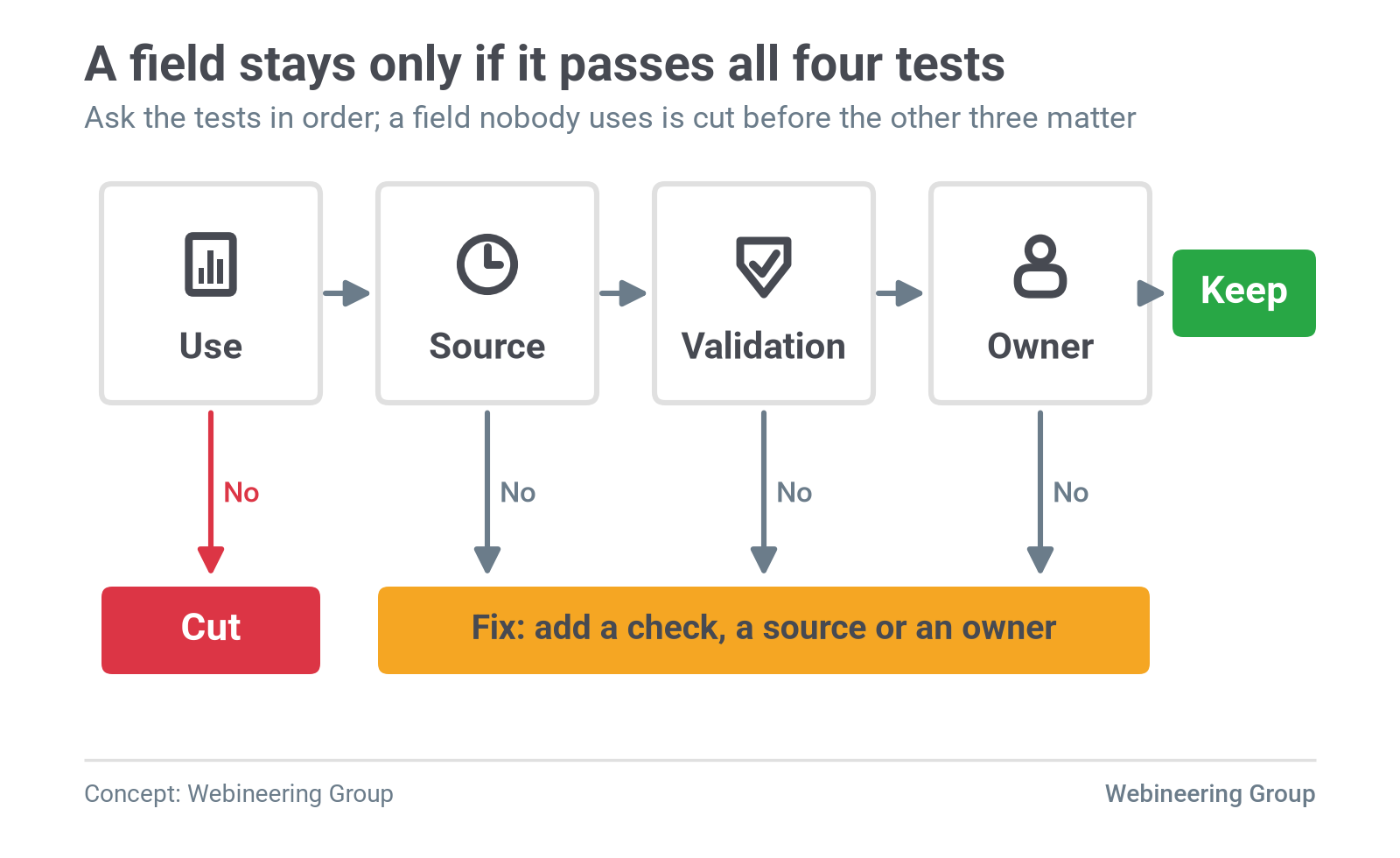
- Use. Which report, meeting or decision reads this field, and how often? Name the document. If you can't, the field has no use, and it gets cut before the other tests matter.
- Source. Who or what records the value, and when? A value entered at the event by the person who saw it scores high. A value rebuilt at shift end scores low.
- Validation. What stops a wrong value from saving? A barcode scan, a short pick list or a cross-check against another field counts. A supervisor glancing at the sheet adds little, as the Barchard and Pace results show.
- Owner. Who corrects the value when it's wrong, and do they know it's their job?
Validation can be as simple as a box to tick. Degani and Wiener cite human-reliability estimates by Alan Swain and H. E. Guttman (1983) for nuclear plant procedures. A checklist item with no check-off had an estimated error probability of one in 100, and adding a check-off cut it to three in 1,000.
Keep fields that pass all four. Fix fields that fail one, usually by adding a check or naming an owner. Cut fields that fail on use, because a field nobody reads only costs time.
Automated capture still needs an owner. Shoplogix, a monitoring vendor, notes in its guide to manufacturing data quality that "manufacturing sensors require regular maintenance and calibration."
Five is a forcing number. The Harvard Business Review method used 10 to 15 attributes per department, and the Elsmar Cove reply named four. Pick the count your team will review every week, and hold to it.
One downtime sheet run through the four tests
Picture the press line's sheet trimmed to the 14 fields its operators fill in most. This example is hypothetical, and the calls depend on what each plant's reports actually read.
| Field | Fails | Call | Reason |
|---|---|---|---|
| Press number | None | Keep | A barcode at the press fills it, and every downtime report groups by it. |
| Date and shift | None | Keep | The terminal stamps it, and shift reports sort on it. |
| Operator ID | None | Keep | A badge scan fills it, and supervisors use it to follow up on stops. |
| Stop start time | Source | Fix | Operators rebuild it at shift end, so take it from the press controller. |
| Stop end time | Source | Fix | Same problem, same fix: let the controller stamp it. |
| Duration | Use | Kill | End time minus start time gives it, and a typed copy can only disagree. |
| Reason code (40 options) | Validation | Fix | Cut the top level to a list an operator can read during the stop. |
| Sub-reason | Use | Kill | No meeting reads it; bring it back for a named, dated study. |
| Part number | Source | Fix | Pull it from the job traveler barcode. |
| Die number | Owner | Fix | Tooling uses die history, so name the tooling lead as owner. |
| Supervisor initials | Validation | Kill | A glance catches little, as the Barchard and Pace results show. |
| Corrective action | Owner | Fix | Maintenance reads it, so make the maintenance lead its owner. |
| Comments | Validation | Fix | Split it into short required entries the next shift can check. |
| Scrap count | Use | Kill | The quality log already records scrap, and two copies drift apart. |
The result is three keeps, seven fixes and four kills. After the fixes, the controller supplies the times, scans supply press, part and operator, and the operator's attention goes to one judgment: why the press stopped.
Field health shows up in records you already have
You can grade a field without a new study. Pull 30 to 50 recent entries and run five checks on each field:
- Blank rate: the share of entries left empty. A rising blank rate usually means the field takes too long or nobody asks for it.
- "Other" rate: the share of reason codes logged as "Other," "Misc" or similar. It shows where the list fails to match what operators see.
- First-option rate: the share of entries that picked the first item or the default. Krosnick's primacy effect predicts a lift here when people rush.
- Identical-value runs: the same value repeated across consecutive entries, such as every stop logged at exactly 10 minutes. It echoes the less varied answers Galesic and Bošnjak found late in long surveys.
- Shift-end clustering: timestamps bunched in the last 15 minutes of the shift. It is the clearest sign of back-filling from memory.
No published study sets a general pass mark for these rates on shop-floor forms. Guidewheel offers one vendor rule of thumb: consolidate reason codes that capture under 1% of events, and consider splitting codes that capture more than 15%. Track each rate weekly and watch its direction.
Reason codes need a short top level
Guidewheel advises keeping the top two levels of a downtime reason tree to "10 or fewer codes total," because "most operators can't reliably distinguish more than that under production pressure." The same page suggests starting with 10 to 15 codes in its frequently asked questions, so treat 10 as a ceiling to test.
Degani and Wiener reached a similar conclusion for cockpits. A checklist designer, they wrote, can decrease the chance of the checklist interrupting other tasks "by reducing the length of a given checklist."
Hick's law explains part of the cost. William Hick's 1952 experiments showed that choice time grows with the logarithm of the number of equally likely options. The law holds best for lists people know well. Andy Cockburn and Carl Gutwin's 2007 model of menu performance found that unfamiliar menus force item-by-item visual search, which grows with every added item.
Practice changes the math. As users learn a menu, search time falls toward zero, and choice time approaches the faster Hick's law curve. So keep the top level short, keep its order stable, and use the words operators already use on the floor.
Short can still mean structured. A single free-text comments box often hides several questions the next shift needs answered. Splitting it into short required entries, such as last job completed, next job queued, open issues and equipment status, with "N/A" allowed where a question doesn't apply, makes every answer checkable.
Retiring a field takes a sign-off and a date
Cutting a field goes better as a small, announced change:
- Get a sign-off from the owner of every report that reads the field. In a regulated plant, route the change through document control.
- Tell the floor which field is going, why, and where to note the information if it still matters.
- Set a review date about 30 days out, and check whether anyone missed the field.
Adding a field takes the same discipline. Name the report or meeting that will read it, name the owner, and print an end date on the form.
Degani and Wiener described what happens without that discipline. When a checklist becomes a "dumping site" for each past problem, immediate problems may be resolved, "but the importance attached to the procedure by the pilots is reduced."
Digitizing a bad form keeps its problems
Moving a form to a tablet changes the pen, and the fields stay the same. Plant Engineering's 2025 guide to paper-on-glass, written by Joe Rappazzo of Applied Control Engineering, starts by asking engineers to evaluate where paper is used and "why it exists." The guide says effective digital workflows should "improve prior manual processes," and its example is a torque reading that the screen validates against its range and links to the specification.
A 40-item pick list on a tablet still takes 40 items of reading during a four-minute stop. Run the four tests first, then digitize what survives.
Regulated records and machine data follow different rules
Regulated records. The U.S. Food and Drug Administration (FDA) said in its December 2018 data integrity guidance that drug manufacturing data "should be attributable, legible, contemporaneously recorded, original or a true copy, and accurate (ALCOA)." The FDA's rule at 21 CFR Part 11 sets the criteria under which the agency treats electronic records and signatures as trustworthy, reliable and generally equivalent to paper. Aerospace suppliers face a parallel duty under AS9100D clause 8.5.2, which requires unique identification of outputs when traceability is a requirement. Those fields stay. Apply the four tests to everything around them, and make the required fields faster to fill in.
Machine-captured signals. Where a controller or sensor records the value, entry burden is close to zero and the vendors' case holds. Let the machine record cycle counts and stop timestamps, and spend the operator's attention on the one thing the machine can't know: why it stopped.
Short studies. A field added for two weeks to answer one question has a use and an end date. Print the removal date on the form when you add the field.
Two common questions have short answers
What percentage of manual data entry has errors? In Barchard and Pace's 2011 study, people who typed values once got 0.95% of them wrong, and Nagle, Redman and Sammon (2017) found that 47% of new business records had at least one critical error.
How many downtime reason codes should operators see? Guidewheel advises 10 or fewer across the top two levels, and Degani and Wiener's checklist research supports keeping any list short enough to finish under pressure.
Monday: start with one form
- Pick the form operators complain about most and print a blank copy.
- Write next to each field the report or meeting that reads it, and circle every field with nothing written.
- Pull 30 recent entries and count blanks, "Other" selections, first-option picks, repeated identical values and entries logged in the last 15 minutes of the shift.
- Name an owner for each field that survives, and tell that person.
- Cut one circled field this week, and tell the crew which one and why.
Score your own forms
The free data-trust scorecard rates each field on source, validation, use and owner, and returns a keep, fix or kill list. For a second set of eyes on the floor, our fixed-fee site assessment covers your forms, logs and the reports they feed.
Site assessment
Want to see where your own line stands?
An evidence-backed report on where real value lies, from the people who stay through implementation.
About the authors
Alex LaDouceur
Founder
Alex has led Webineering since it started in 2022. At DuPont's Circleville plant he held senior engineering and engineering management roles on the $250 million Kapton and Pyralux expansion, a continuous web line taken from design to qualified production. At Schlumberger he was responsible for assembly, test and refurbishment across deepwater completions product lines.